Soft start: yes (with high power and load module may fail when starting)
Protection mechanism:
Input anti-reverse connection;
Output anti-reverse irrigation;
Input undervoltage protection (4.8-30v adjustable,default 4.8v)
Output overvoltage protection (0.5-31v adjustable,default 31V)
Output overcurrent protection 0-4.1a (adjustable,default 4.1a)
Overpower protection (0-50w adjustable,default 50W)
Overtemperature protection (80-110℃ adjustable,default 110℃)
Timeout protection (0-100h adjustable,off by default)
Super capacity protection (0-60ah adjustable,off by default)
Operating frequency: 180KHZ
Dimensions: length * width * height 79mm*43mm*26mm
Weight: 92g (including package)
Method of use
5.1. Switch display parameters -- in the normal interface,press SW to switch the display below the display screen,and switch the display content between current A power W capacity Ah time h.Long press SW button to switch the uplink display on the display screen and switch the display content between input voltage IN output voltage OUT.
5.2. Set output voltage -- press U/I button in the normal interface to enter the interface of setting voltage constant current.It can be seen that a certain digit of the output voltage value is flashing. Rotate the encoder left and right to adjust the major and minor.Short press the rotary encoder to choose which bit of output voltage to set.After setting,press U/I button 2 times to return to the normal interface.Or automatically return to the normal interface after stopping operation for 10s.
5.3. Set constant current value (that is,the maximum current value allowed to output by the module) -- press U/I button in the normal interface to enter the setting voltage constant current interface.Then press U/I button and switch to setting constant current value. You can see a bit of the setting constant current value flashing. Rotate the rotary encoder left and right to adjust the major and minor.Short press the rotary encoder to choose which bit to set the constant current value.After setting,press U/I to exit the setting voltage constant current interface and return to the normal interface.Or automatically return to the normal interface after stopping operation for 10s.
5.4. Set the default on/off state of module power-on -- long press U/I in the normal interface to enter the parameter setting interface.You can see that it shows "OPEN OFF" or "OPEN ON". "OPEN OFF" means the output is turned OFF by default when power is ON,and "OPEN ON" means the output is turned ON by default when power is ON.Long press rotate encoder to switch two states.After setting,long press U/I to return to the normal interface.
5.5. Setting of protection parameters on state and threshold -- long press U/I to enter the parameter setting interface in the normal interface.Press SW until the protection you want appears.LUP -- undervoltage protection threshold;OUP -- overvoltage protection threshold;OCP -- overcurrent protection threshold;OPP -- over power protection threshold;OAP -- ultra-capacity protection threshold;OHP timeout protection threshold;OTP -- overtemperature protection threshold.Short press rotate encoder to select which bit you want to set the protection parameter.Long press the rotary encoder to set the protection parameters on or off (only timeout protection and supercapacity protection can be set to turn on/off,and other protection parameters are turned on by default.).Rotate the encoder left and right to make the parameters bigger and smaller.After setting,long press U/I to return to the normal interface.
5.6. Calibration voltage and current -- press U/I button to enter the parameter setting interface under normal interface.Press SW until a parameter interface with CAL appears.The calibration input voltage interface with the symbol CAL+IN+V;The calibration output voltage interface with the symbol CAL+OUT+V;The calibration output current interface with the symbol CAL+OUT+A.Rotate the encoder left and right to adjust the size of parameters.After the adjustment is completed,long press the rotary encoder to confirm the adjustment is completed,and the parameter value is no longer flashing.Long press U/I to return to the normal interface.
Note: in order to ensure the accuracy of calibration,calibration voltage -- above 12V can only be started;Calibration current - start calibration only when the current is above 1A.
Cautions
7.1. Short connection between input IN and output OUT of the module is forbidden,or the constant current function will fail.
7.2. Please ensure that the power moment of the power supply exceeds the required power of the output load!
7.3. If the module wants to output with full load,the input voltage should be above 8V. When the input voltage is 5V,the output power is about 15W.The maximum module current value is 4A,subject to the maximum output power,such as 17V,the current should not be greater than 2A.
7.4. When this module is used over 3A and 35W,please strengthen heat dissipation!!!
7.5. The module has input undervoltage protection function,which is about 4.8v by default (it can be set),and the output will be automatically disconnected after the value is lower than this value (note that the voltage at the module port is lower than the undervoltage protection threshold,and when the input current is relatively large,do not ignore the partial voltage on the input wire).
Logistics information
Our products are located in Hong Kong, China, and the logistics speed depends on your specific location. According to our experience, it usually takes about 15-20 days of transportation time
CONTACT US
If you have questions or concerns then please do not hesitate to get in contact with us.
We would love to hear from you, contact us on:
whatsapp:+8613625959351
RETURNS POLICY
Lorem ipsum dolor sit amet, consectetur adipiscing elit. Morbi ut blandit risus. Donec mollis nec tellus et rutrum. Orci varius natoque penatibus et magnis dis parturient montes, nascetur ridiculus mus. Ut consequat quam a purus faucibus scelerisque. Mauris ac dui ante. Pellentesque congue porttitor tempus. Donec sodales dapibus urna sed dictum. Duis congue posuere libero, a aliquam est porta quis.
Donec ullamcorper magna enim, vitae fermentum turpis elementum quis. Interdum et malesuada fames ac ante ipsum primis in faucibus.
Curabitur vel sem mi. Proin in lobortis ipsum. Aliquam rutrum tempor ex ac rutrum. Maecenas nunc nulla, placerat at eleifend in, viverra etos sem. Nam sagittis lacus metus, dignissim blandit magna euismod eget. Suspendisse a nisl lacus. Phasellus eget augue tincidunt, sollicitudin lectus sed, convallis desto. Pellentesque vitae dui lacinia, venenatis erat sit amet, fringilla felis. Nullam maximus nisi nec mi facilisis.
SHIPPING
Lorem ipsum dolor sit amet, consectetur adipiscing elit. Morbi ut blandit risus. Donec mollis nec tellus et rutrum. Orci varius natoque penatibus et magnis dis parturient montes, nascetur ridiculus mus. Ut consequat quam a purus faucibus scelerisque. Mauris ac dui ante. Pellentesque congue porttitor tempus. Donec sodales dapibus urna sed dictum. Duis congue posuere libero, a aliquam est porta quis.
Donec ullamcorper magna enim, vitae fermentum turpis elementum quis. Interdum et malesuada fames ac ante ipsum primis in faucibus.
Curabitur vel sem mi. Proin in lobortis ipsum. Aliquam rutrum tempor ex ac rutrum. Maecenas nunc nulla, placerat at eleifend in, viverra etos sem. Nam sagittis lacus metus, dignissim blandit magna euismod eget. Suspendisse a nisl lacus. Phasellus eget augue tincidunt, sollicitudin lectus sed, convallis desto. Pellentesque vitae dui lacinia, venenatis erat sit amet, fringilla felis. Nullam maximus nisi nec mi facilisis.
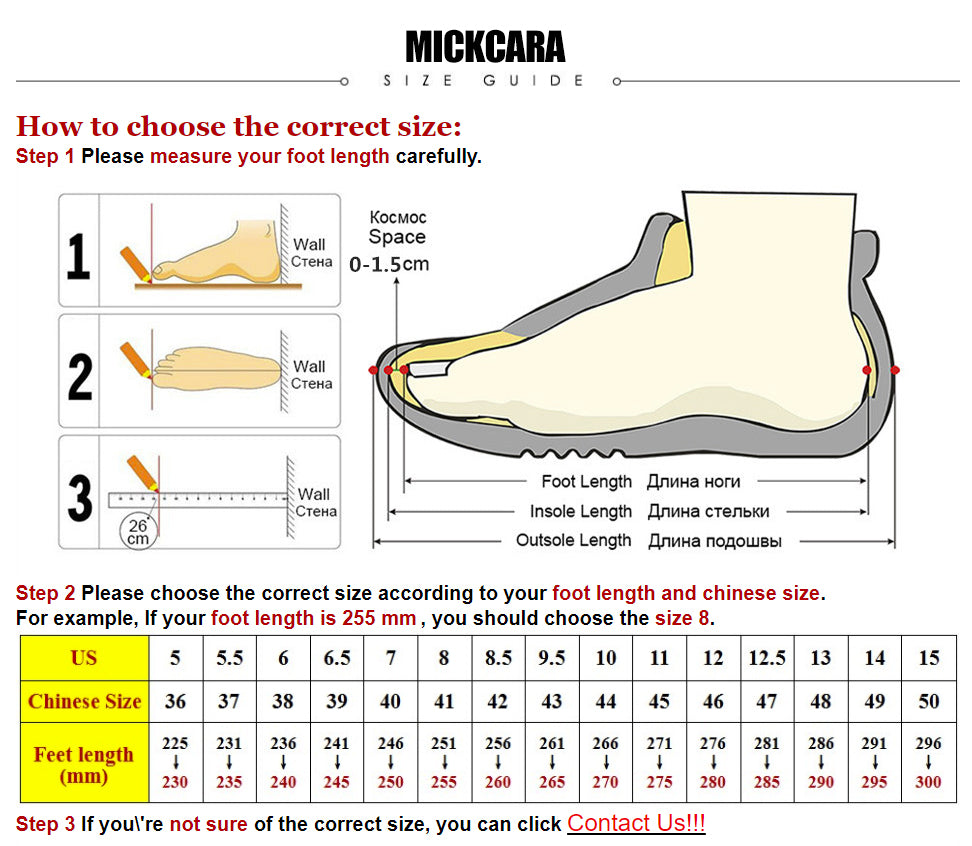
How to choose the correct size:
Step 1 Please measure your foot length carefully.
Step 2 Please choose the correct size according to your foot length and chinese size.
For example, If your foot length is 255 mm , you should choose the size 8.
Step 3 If you\'re not sure of the correct size, you can click chat with us!
WHATSAPP:+8613625959351