FM intercom comprehensive tester RF signal generator 1MHz--470MHz trunking tester Interphone tester

2 sold in last 8 hours
mickcara
cawd0a0064
In stock
$388.19
Size Guide
$388.19
customers are viewing this product
Tags:
1. frequency measurement 10MHz~900MHz resolution 1KHz or 0.1KHz
2.power measurement 0.1W~64W (greater power, please shorten test time and aVoid overheating)
3. sub audio measurement 50Hz~260Hz analog sub tone and standard digital sub sound
 
Receive measurements
 
1. RF signal generator 1MHz--470MHz
2. output level: -132dBm to -90dBm
3. single tone modulation: 1KHz, 2KHz, 3KHz optional, output modulation system: 3K
4. sub tone output: 50Hz---260Hz analog sub tone and standard digital sub tone, output range: 0.5K
 
Relay test
 
Specially designed for debugging and measuring of U/V relay station and FM radio set.The signal generator can operate in duplex mode, i.e.The tested machine is in the firing state and does not affect the generator operation. It can be used in the relay station to transmit measurement.
 
Working voltage: 8-12V DC (DC)
Work current: 200mA

 
Walkie Talkie
Signal source mode:
The first line to the left Frequency0.5-470M) Right Output power-9Zero---131dBm)
The second line on the left Sub audio (50.0-280.0HzAny analog sub tone and105Group number sub tone) Right Modulation tone1-3K) The lower right corner shows the input power
Numeric key: direct entry for cursor entry
Up and down key: step by step, adjust cursor to project value
F1Key: cursor pointing movement(long press switch to frequency meter mode)
F2Key: backspace key
F3Key: function key The cursor points to the output power, sub tone, and modulation tone Function as loop switch Example: when the cursor points to the power output The function of the key is the output of the cycle switch signal.
F4Key: Unused
Analog sub tone settings:Direct input sub audio point4digit,not enough4Bit anterior complement"0"Cases88.5Hzinput0,8,8,5
Now, if you use the up and down key, the0.1HzStep adjustment, if required, by standard50Group tone adjustment to input0,0,0,ZeroAfter using the up and down key, the adjustment will proceed from the first standard sub tone67HzStart adjusting.
Digital sub tone settings:input3Digit bit tone code According to theF3example023First input02ThreeThen pressF3The settings are successful. PressF2Keys can be in digital sub toneIandNSwitch between the upper and lower keys105Addition and subtraction in group numbers.
The value of the modulation tone and sub sound input0 Equivalent to shutting down.
Step frequency setting:When the cursor points to the frequency, press longF3The currently displayed frequency is saved as step frequency.
 
Cymometer model:
The first line to the left frequency Right Measurement modelAUTO/MANUA(to be able to simultaneously measure the emission sub tones of a walkie talkie or relay station, please selectAUTOMode
The second line on the left Sub audio Right Frequency resolution1K/0.1K) to test the frequency of the transmitter or relay station, the frequency is graceful0.1kWill be more accurate) The lower right corner shows the input power
Numeric key: Unused
Up and down key: Unused
F1Key:Long press to switch to signal source mode
F2Key: Unused
F3Key: frequency meter resolution switching1K/0.1K
F4Key: measurement mode switchingAUTO/ MANUA AUTOWhen the stable frequency is detected, the sub tone is automatically locked and detected, and the results are displayed until the signal disappears, and the signal disappears and continues to be re tested, waiting for the new stable frequency. (you can detect the standard and nonstandard analog tones of your own radio station. If the radio is a digital sub tone, only the standard digital sub tone can be detected, and the nonstandard digit sub tone can not be detected.)
MANUAConventional frequency meter Real time detection update frequency.
 
Note: at any time, as long as the input power, the lower right corner shows the input power.
Size: 160*160*65mmIncludes a prominent part)
afterHP8921ARadio comprehensive test instrument calibration:
1. Frequency accuracy is deviation50Hzwithin
2. vThe intensity of the output signal of the segmentHP8921AQuite
3. USegment output signal strength ratioHP8921A4DBM (when the output of a weak signal is better than this, when the instrument shows -125dbm, the actual value is -121dbm), and the strong signal output is the same as that of HP8921A (for example, about -90dbm)
4. The audio modulation system for the output of the signal is3K
5.The sub tone system in the signal output is0.5K
6.When the frequency meter function, the minimum power input required is 1MW (external antenna, 1W interphone can be measured by close distance launching)
7. power meter in0.2WAbove heelHP8921AYes, less than 0.2At W, the display value is about 20% larger than the actual value (estimated to be 4 to 5).
8. to test the power of more than 5W appropriate to shorten the testing time, avoid testing power for a long time, because the heat inside the board size is limited, to avoid overheating, if you really need to test the power for a long time, please increase the heat sink area and forced cooling fan.

Package Includes:

1 x FM Intercom Comprehensive Teste


RETURNS POLICY

Lorem ipsum dolor sit amet, consectetur adipiscing elit. Morbi ut blandit risus. Donec mollis nec tellus et rutrum. Orci varius natoque penatibus et magnis dis parturient montes, nascetur ridiculus mus. Ut consequat quam a purus faucibus scelerisque. Mauris ac dui ante. Pellentesque congue porttitor tempus. Donec sodales dapibus urna sed dictum. Duis congue posuere libero, a aliquam est porta quis.

Donec ullamcorper magna enim, vitae fermentum turpis elementum quis. Interdum et malesuada fames ac ante ipsum primis in faucibus.

Curabitur vel sem mi. Proin in lobortis ipsum. Aliquam rutrum tempor ex ac rutrum. Maecenas nunc nulla, placerat at eleifend in, viverra etos sem. Nam sagittis lacus metus, dignissim blandit magna euismod eget. Suspendisse a nisl lacus. Phasellus eget augue tincidunt, sollicitudin lectus sed, convallis desto. Pellentesque vitae dui lacinia, venenatis erat sit amet, fringilla felis. Nullam maximus nisi nec mi facilisis.

SHIPPING

Lorem ipsum dolor sit amet, consectetur adipiscing elit. Morbi ut blandit risus. Donec mollis nec tellus et rutrum. Orci varius natoque penatibus et magnis dis parturient montes, nascetur ridiculus mus. Ut consequat quam a purus faucibus scelerisque. Mauris ac dui ante. Pellentesque congue porttitor tempus. Donec sodales dapibus urna sed dictum. Duis congue posuere libero, a aliquam est porta quis.

Donec ullamcorper magna enim, vitae fermentum turpis elementum quis. Interdum et malesuada fames ac ante ipsum primis in faucibus.

Curabitur vel sem mi. Proin in lobortis ipsum. Aliquam rutrum tempor ex ac rutrum. Maecenas nunc nulla, placerat at eleifend in, viverra etos sem. Nam sagittis lacus metus, dignissim blandit magna euismod eget. Suspendisse a nisl lacus. Phasellus eget augue tincidunt, sollicitudin lectus sed, convallis desto. Pellentesque vitae dui lacinia, venenatis erat sit amet, fringilla felis. Nullam maximus nisi nec mi facilisis.

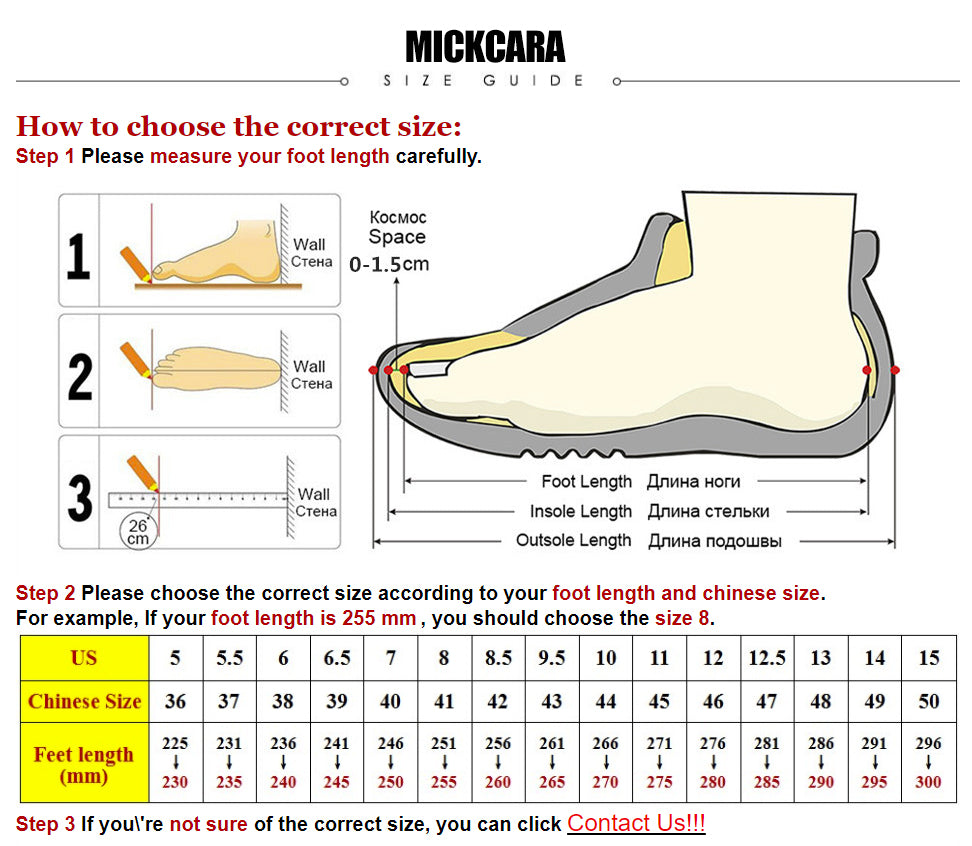
How to choose the correct size:

Step 1 Please measure your foot length carefully.

Step 2 Please choose the correct size according to your foot length and chinese size.

For example, If your foot length is 255 mm , you should choose the size 8.

Step 3 If you\'re not sure of the correct size, you can click chat with us!

WHATSAPP:+8613625959351

Avoir des questions? Demandez à un expert
FM intercom comprehensive tester RF signal generator 1MHz--470MHz trunking tester Interphone tester
You have successfully subscribed!