16-bit Devices
dsPIC30F/33F, PIC24F/H
32-bit Devices
PIC32MX
Features
Programming function: Can burn and write FLASH ROM, EEPROM, etc.
Simulation function: supports various debugging methods such as full-speed running, single-step debugging, and breakpoint debugging.
Simulation performance: using USB interface for simulation debugging, single step debugging, breakpoint debugging, fast response speed!
Programming performance: using USB interface for ICSP download, fast download speed!
Use USB interface to connect to PC
PICkit3 development tool has built-in driver to realize high-speed USB communication.
Connection interface with target board
ICSP standard interface specified by PICkit3.
Firmware can be upgraded
In the future, Microchip will introduce more PIC models, and will also add new device models to the ICSP device support list. When you need to use the latest models in future development, upgrade kit3, and upgrade firmware programs, you will be able to support the new Model!
The upgrade method is automatic upgrade, and Microchip will provide an upgrade program.
Tool description:
The PICkit 3 programmer/debugger is a simple low-cost online debugger controlled by a PC running MPLAB IDE (v8.20 or higher) software on a Windows® platform.
PICkit3 can program and debug almost all series of PIC FLASH microcontroller chips such as Microchip's PIC10/12/16/18/24/32, dsPIC30/dsPIC33, etc. And PICkit3 can program Microchip's KEELOQ HCS series chips, MCP250xx CAN series chips, and EEPROM memory chips.
Compared with PICkit2, PICkit3 has the advantages of stable simulation, more supported models, and faster speed. It can stably support PIC16 PIC18 PIC24 DSPIC series MCU simulation and download.
Since the ICSP interface of PIC has only one row of 6PIN connectors, when connecting PICkit3 to the PIC target board, you need to pay attention to the left and right direction of the connection. Do not insert it backwards to avoid burning the PICkit3 downloader.
Status of PICkit3's LED indicator
The indicators have the following meanings:
Power:
Green, it lights up when it is powered on or connected to the target board.
Active:
Blue, it lights when the PICkit 3 has established communication with the PC or sending/receiving commands.
Status:
Green, lights up when the debugger is working normally (standby).
Yellow, lights up when the operation is busy.
Red, lights up when the debugger fails.
Logistics information
Our products are located in Hong Kong, China, and the logistics speed depends on your specific location. According to our experience, it usually takes about 15-20 days of transportation time
CONTACT US
If you have questions or concerns then please do not hesitate to get in contact with us.
We would love to hear from you, contact us on:
whatsapp:+8613625959351
RETURNS POLICY
Lorem ipsum dolor sit amet, consectetur adipiscing elit. Morbi ut blandit risus. Donec mollis nec tellus et rutrum. Orci varius natoque penatibus et magnis dis parturient montes, nascetur ridiculus mus. Ut consequat quam a purus faucibus scelerisque. Mauris ac dui ante. Pellentesque congue porttitor tempus. Donec sodales dapibus urna sed dictum. Duis congue posuere libero, a aliquam est porta quis.
Donec ullamcorper magna enim, vitae fermentum turpis elementum quis. Interdum et malesuada fames ac ante ipsum primis in faucibus.
Curabitur vel sem mi. Proin in lobortis ipsum. Aliquam rutrum tempor ex ac rutrum. Maecenas nunc nulla, placerat at eleifend in, viverra etos sem. Nam sagittis lacus metus, dignissim blandit magna euismod eget. Suspendisse a nisl lacus. Phasellus eget augue tincidunt, sollicitudin lectus sed, convallis desto. Pellentesque vitae dui lacinia, venenatis erat sit amet, fringilla felis. Nullam maximus nisi nec mi facilisis.
SHIPPING
Lorem ipsum dolor sit amet, consectetur adipiscing elit. Morbi ut blandit risus. Donec mollis nec tellus et rutrum. Orci varius natoque penatibus et magnis dis parturient montes, nascetur ridiculus mus. Ut consequat quam a purus faucibus scelerisque. Mauris ac dui ante. Pellentesque congue porttitor tempus. Donec sodales dapibus urna sed dictum. Duis congue posuere libero, a aliquam est porta quis.
Donec ullamcorper magna enim, vitae fermentum turpis elementum quis. Interdum et malesuada fames ac ante ipsum primis in faucibus.
Curabitur vel sem mi. Proin in lobortis ipsum. Aliquam rutrum tempor ex ac rutrum. Maecenas nunc nulla, placerat at eleifend in, viverra etos sem. Nam sagittis lacus metus, dignissim blandit magna euismod eget. Suspendisse a nisl lacus. Phasellus eget augue tincidunt, sollicitudin lectus sed, convallis desto. Pellentesque vitae dui lacinia, venenatis erat sit amet, fringilla felis. Nullam maximus nisi nec mi facilisis.
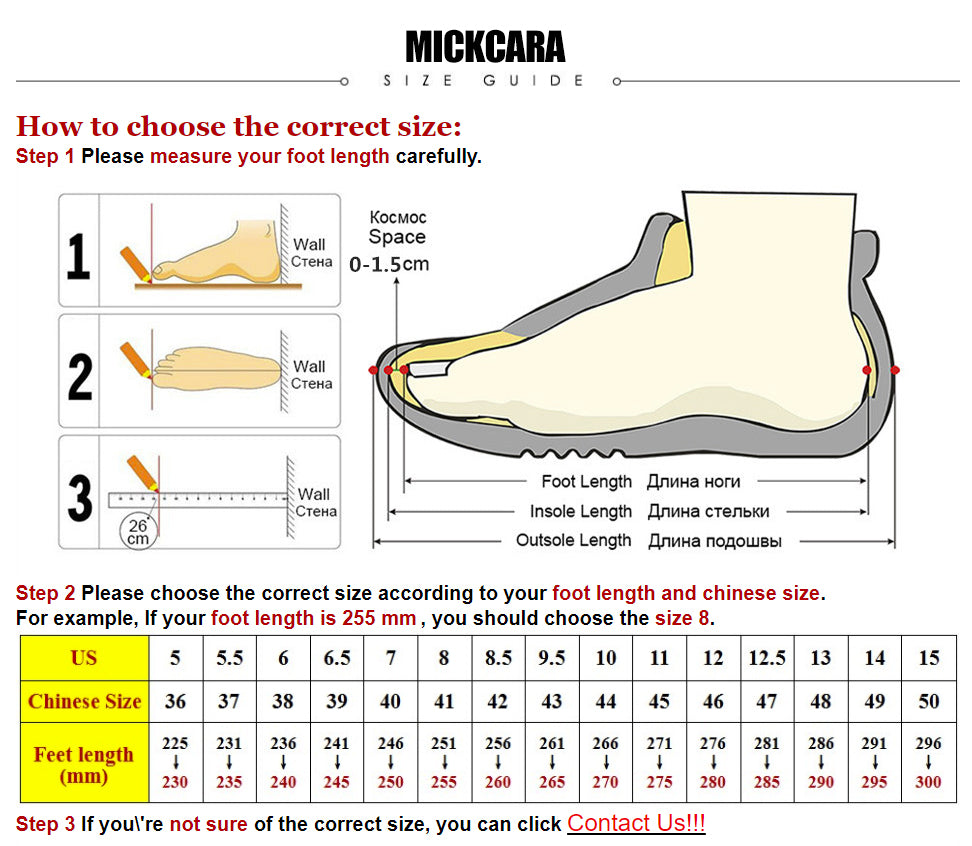
How to choose the correct size:
Step 1 Please measure your foot length carefully.
Step 2 Please choose the correct size according to your foot length and chinese size.
For example, If your foot length is 255 mm , you should choose the size 8.
Step 3 If you\'re not sure of the correct size, you can click chat with us!
WHATSAPP:+8613625959351